Collaborative Financial Planning with Firm-Level Control
RightCapital is designed to scale alongside the firms that use our software. As firms seek more collaboration and control over planning parameters, they can enable RightCapital's firm settings. Firm Settings provide options for control over:
Templates for PDF reports, Planning Access, the Vault, & the Snapshot module
Custom models, including Model Portfolios, Glide Paths, Return Scenarios, Vesting Schedules, and Retirement Spending Strategies
Firm Administrator Overview

Currently, there are 4 different admin roles, each role will have control over different aspects of the system:
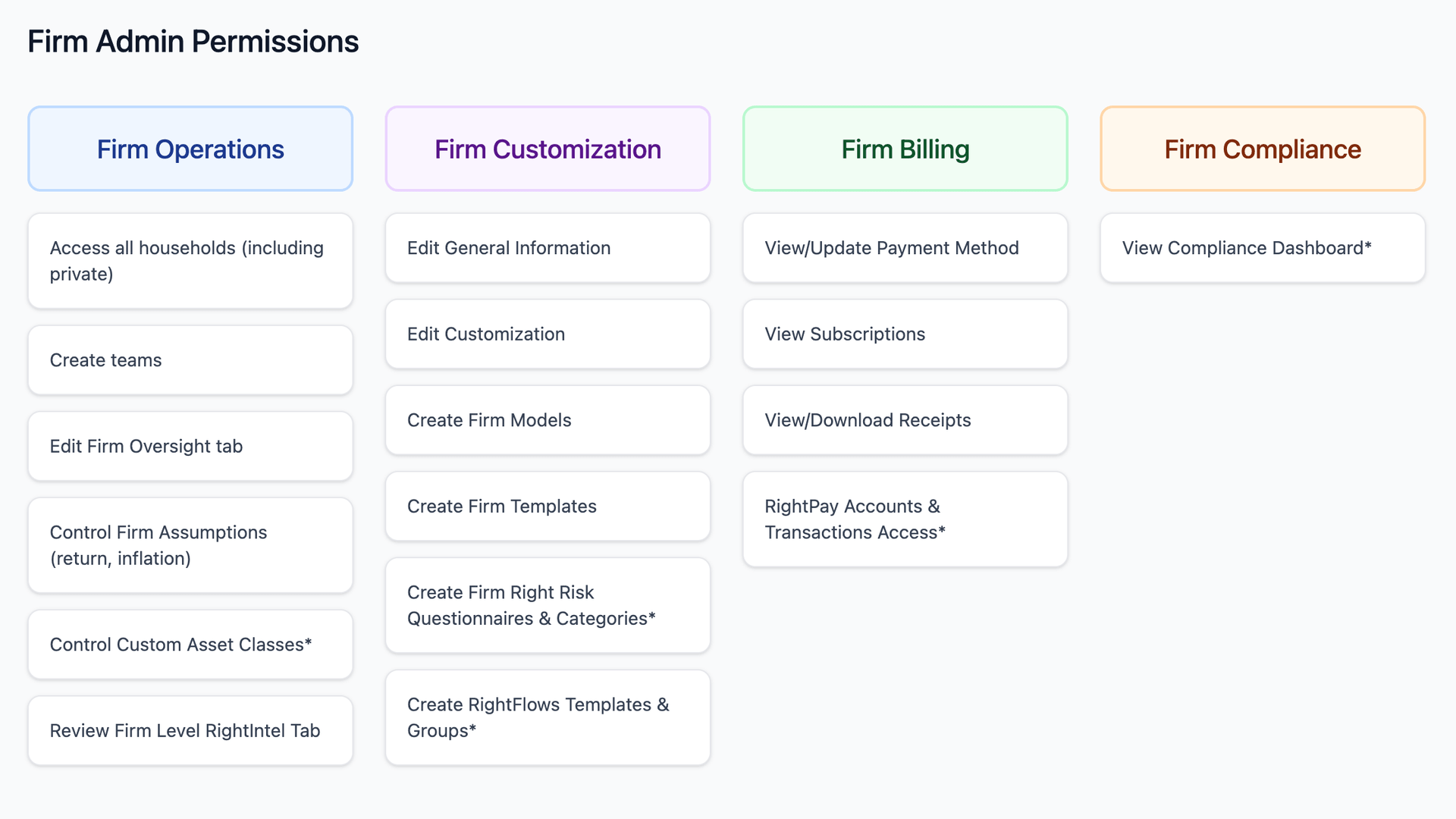
Customization Admin
General Information

Customization

For more information and details pertaining to custom branding, please reference this article.
Templates

Models
The Customization Administrator of an organization will be able to create Portfolio, Glide, Scenario, Vesting, and Retirement Spending Models for the firm that can then be used among advisors. The firm-level models will be treated like our default models and can not be edited by advisors. Advisors will continue to have the ability to create their models within their Advisor Portal > Models tab.
Risk
If Risk is enabled for your firm, there will be an additional 'Risk' section within the Admin tab. The Customization Administrator of an organization will be able to create risk tolerance questionnaires for the firm that can then be used among advisors. The firm-level questionnaires can not be edited by advisors.

There will also be an additional "Risk" section in the Oversight tab, where you can control if firm members can create their own questionnaires. If this option is deselected, firm members will only be able to use firm-level questionnaires.

Beneath this option, you can also determine if
Advisors are able to utilize their own Risk Categories.
If you'd like them to adhere to a set of firm-level categories.
If they can choose between the two. You can also opt to disable risk category functionality at the firm level.

Choosing an option that includes firm-level categories will add an additional Categories tab to the Risk area, allowing you to dial in the risk categories at the firm level:

Operations Administrator
Oversight
The Oversight tab will allow the Operations Administrator to control if the firm member can:
Update their firm name.
Update their address.
Use their own report disclosures.
Customize their branding.
Customize their invitation email template.
Customize inflation and misc. assumptions (if enabled)
Allow use of the Iris AI for team members

Asset Returns
Controlling return assumptions for your team and reviewing these assumptions periodically is essential to keeping your team confident during client presentations. Using historical data to set return assumptions provides a systematic approach to factoring the historical experience data into your financial projection. Using a forward-looking method allows you to incorporate more subjectivity into the projection. Controlling asset returns at the firm level creates consistency for team members. It removes individual advisors' ability to adjust each asset class's return rate and volatility.

Asset Class
When Custom Asset Classes are enabled, we use a different model to generate Monte Carlo scenarios. This is to account for the flexibility provided for updating volatility and correlation assumptions. This granular approach utilizes a standard log-normal distribution model. If you enable Custom Asset Classes, you may see different results for existing plans. This feature cannot be turned off once enabled for the firm. For more information about Custom Asset Classes, click here.

Correlation
A calculation will run to ensure the correlation matrix is valid; if not, an error message will display, and values must be corrected. An example of an invalid correlation matrix would be if category A is 100% correlated with category B, category B is 100% correlated with category C, but category A is negatively correlated with category C.

Inflation & Misc. Assumptions

Operations Administrators can also specify if firm members must use the new firm-level assumptions, or if they can use their own. This is set within the Oversight tab.


