In situations where you may want to see a certain asset included in a client's current net worth, but excluded from a client's retirement projections, Balance Sheet Only is a useful option. For each asset and liability entered into a client's Profile > Net Worth section, you will find an "Included in Plan" setting within the data entry drawer. One of the options for this setting is 'Balance Sheet Only':
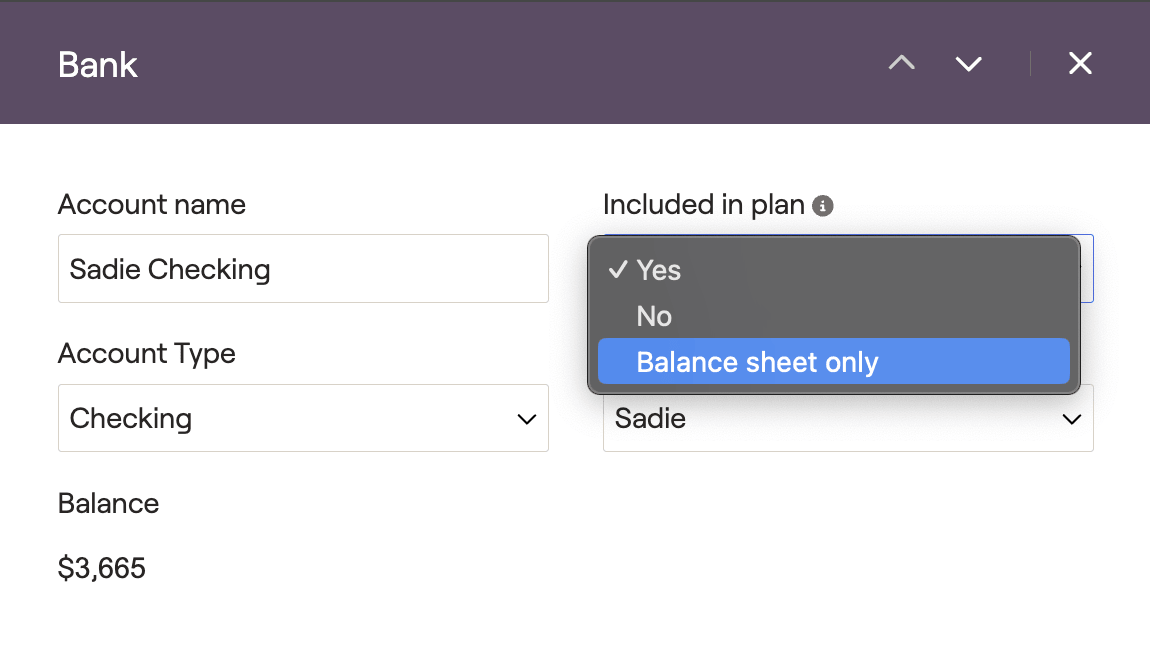
Whereas the 'Yes' and 'No' options will fully include or exclude the account from the entire client plan, the Balance Sheet Only option is unique in that it will only include the asset in the client's current net worth, and in the client's balance sheet. The asset will be excluded from all other areas of the plan.
Assets set to Balance Sheet Only will be visible in the following locations:
Profile > Net Worth
Dashboard > Balance Sheet
Dashboard > Snapshot (within the Net Worth and Balance Sheet widgets)
Assets set to Balance Sheet Only will be excluded from the following areas:
The Insurance Module
The Education Module
The Tax Module
The Estate Module
Important Note on the Mobile App
Please note that accounts listed as Balance Sheet Only will not display within the Dashboard section of the mobile app. The value of the account will still be factored into the total net worth figure at the top of the Dashboard.


