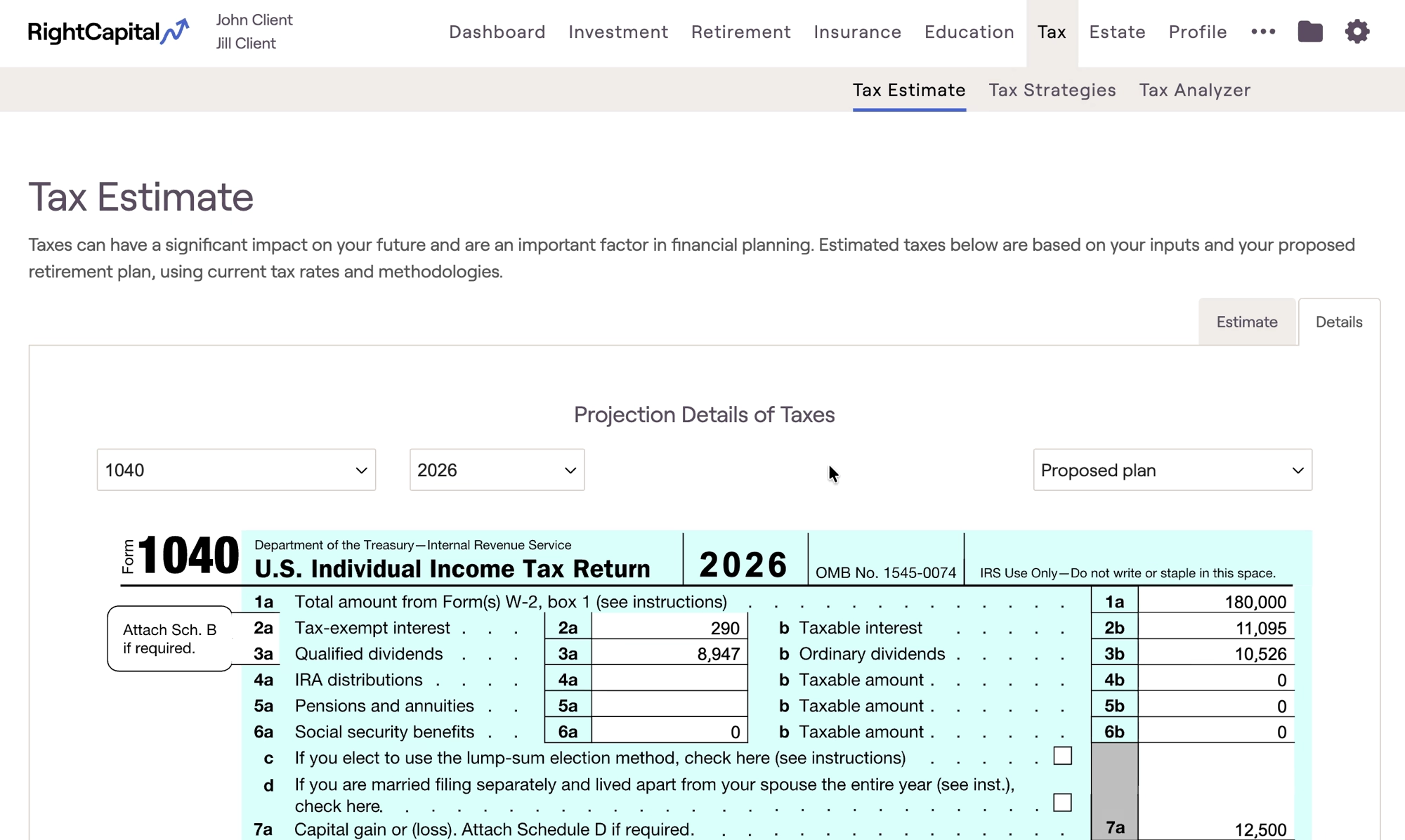
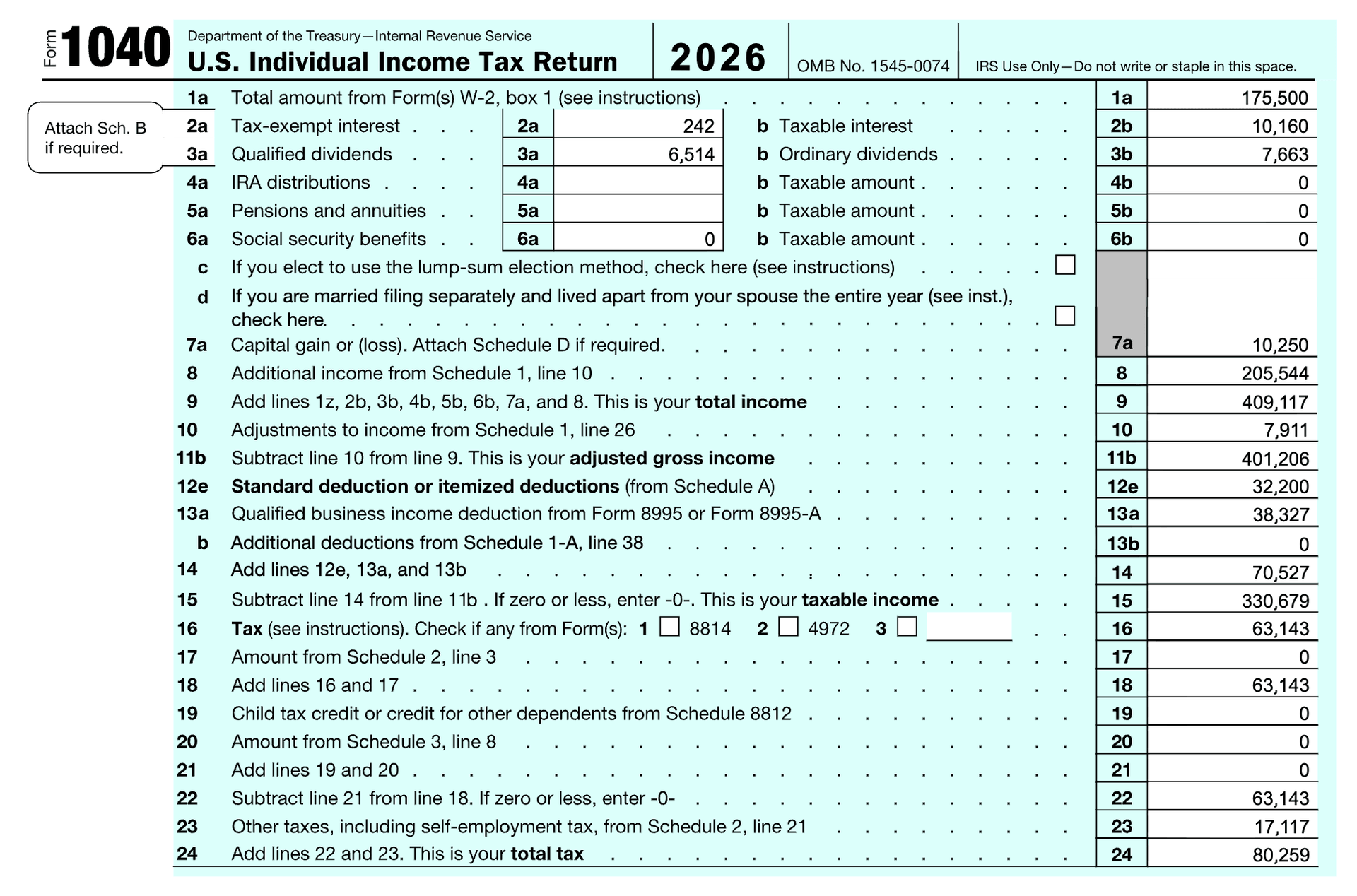
The Sample 1040 tax form provides insight into a client's estimated federal tax figures each year. This screen reflects a "simplified" 1040, which is a shorter form only displaying key details and information that will apply to almost all clients.
You can find this form by navigating to the Tax > Tax Estimate > Details page:
Watch our video overview!
If you'd prefer to watch a video overview of the simplified 1040 tax form, feel free to click the link below:
The 1040 is prepopulated with values based on the cash flow information and data entry inputs within each client plan. Using the dropdown menu in the upper left, you can toggle between the 1040 forms for each year of the future-looking projections. In the upper right you can choose between viewing your current and proposed plans.
Line 1 Wages, salaries, tips: Reflects total wages, salaries, tips etc. Less contributions to the client's 401(k) or comparable retirement plans, pre-tax insurance premiums, and tax-deductible expenses.
Line 2a Tax-exempt interest and 2b taxable interest: This value is based on the returns from bonds and cash in taxable accounts held in the client's asset allocation. Withdrawals from a taxable account are not needed to trigger interest on the 1040.
To view or customize the interest assumptions by asset class, you can navigate to the Gear Icon > Settings > Return Assumptions tab.
Line 3a Qualified dividends and 3b ordinary dividends: This value is based upon the returns from equities and 'other' investments held in taxable accounts within the client's asset allocation. Withdrawals from a taxable account are not needed to trigger dividends on the 1040.
To view or customize the dividend assumptions by asset class, you can navigate to the Gear Icon > Settings > Return Assumptions tab.
You can modify the percentage of dividends that are tax-qualified by navigating to the Gear Icon > Settings > Tax Assumptions tab.
Line 4b IRA distributions: This value represents any distributions (RMDs, manual distributions, Roth conversions) from 401(k) and IRA accounts.
Line 5b Pensions and annuities: This reflects any pension or annuity income entered in Profile > Income, or income/distributions from annuities or pension plans entered in the Profile > Net Worth section.
Line 6a Social security benefits and 6b Taxable amount: This reflects any social security retirement income entered in Profile > Income, in addition to spousal and survivor benefits. To see a greater breakdown, see Taxable Social Security.
Line 7a Capital gain or (loss): This reflects income from capital gains. This can occur as a result of taxable distributions/withdrawals, the sale of a property/business/lifestyle asset, liquidation of stock options/grants, or portfolio turnover. To see a greater breakdown of the capital gains, see Schedule D.
You can modify the percentage of capital gains that are assumed to be long-term by navigating to the Gear Icon > Settings > Tax Assumptions tab.
Line 8 Other income: Reflects other income (such as self-employment income, rental income, and business income) feeding in from the Schedule 1.
Line 9 Total income: Reflects the client's total income, which is the sum total of lines 1 - 8.
Line 10 Adjustments to income: Reflects additional deductions and adjustments to income feeding in from the Schedule 1.
Line 11b Adjusted gross income: This value represents the client / household's AGI for a given year (total income less adjustments to income).
Line 12e Standard deduction or itemized deductions (from Schedule A): This value will reflect the standard deduction based on the filing status, as well as itemized deductions. RightCapital will automatically apply whichever is higher between the standard deduction or itemized deductions each year.
The Filing Status can be adjusted in the Profile > Expenses > Tax and Fees data card.
Line 13a Qualified business income deduction: This value illustrates the QBI deduction under for any income associated with business types LLC, Partnership, or S Corp, as well as any 'Self-employment income' cards. The deduction reflects 20% of business income.
Line 13b: Reflects line 38 of Schedule 1-A for "Additional Deductions". This includes the Senior Deduction.
Line 15 Taxable income: This value represents the client / household's Taxable income for a given year (AGI less Lines 12 and 13).
Line 17: Reflects any AMT feeding in from the Schedule 2. More details can be found via the Alternative Minimum Tax form.
Line 19 Child tax credit: Reflects child tax credits for dependent children listed in the Profile > Family tab (up to $2,200 per child).
Line 20: Reflects any education credits for children in the plan with college goals.
Line 23 Other taxes: Will display and additional self-employment taxes feeding in from the Schedule 2.
Line 24 Total Tax: Total federal tax paid by the client in the chosen year.
Contact Us
For additional assistance within RightCapital please contact our Support team.
Educational Webinars
RightCapital is committed to enabling your success. Each week, we cover essential planning modules and product updates.
RightCapital in Action
Check out our YouTube channel where we highlight Advisor Success Stories and share more Tips & Tricks!