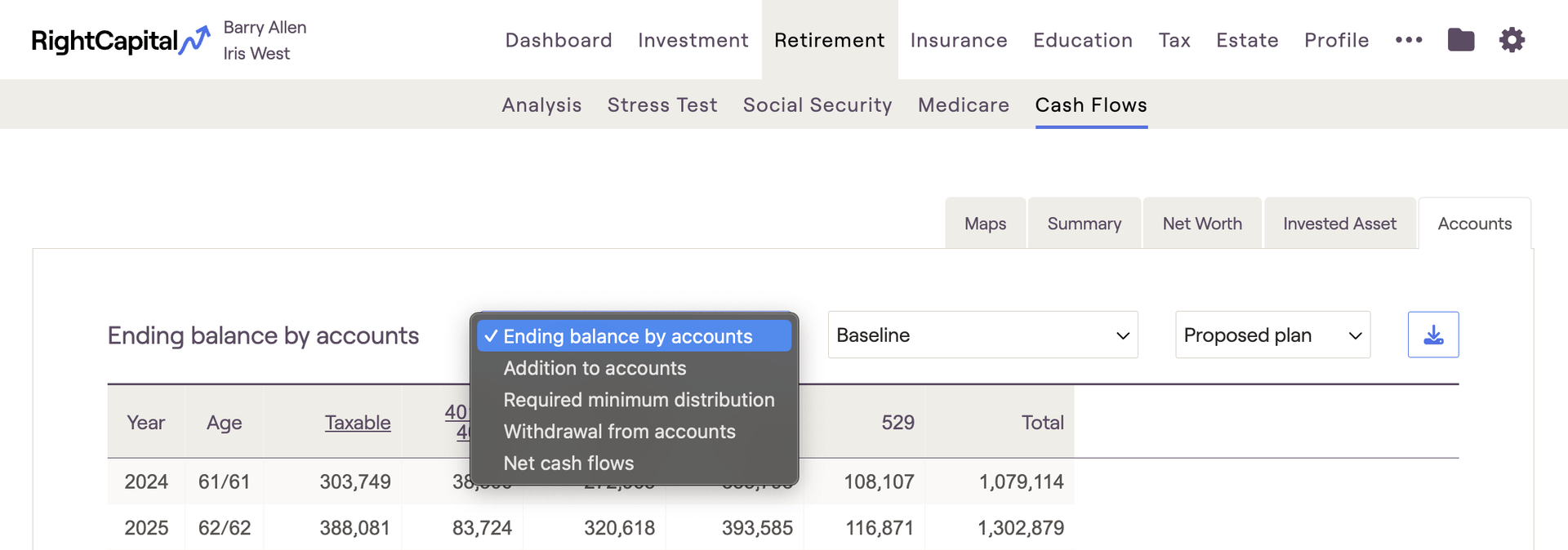
The Accounts tab of the Cash Flows allows you to see details for each type of account within the plan (Taxable, 401(k), IRA, etc). To access the Cash Flows, navigate to Retirement > Cash Flows section of a client plan:

Accounts | Definition |
|---|---|
Ending balance by accounts | The end of period balance for each type of account - the Total will tie to the Ending Balance on the Invested Asset tab. |
Addition to accounts | All contributions (including planned saving, employer contribution, and saving to taxable accounts) to each type of account. |
Required Minimum Distribution | Reflects the required distribution of assets from tax-deferred accounts into the taxable account when the client reaches RMD age. |
Withdrawal from accounts | Reflects withdrawals from each account type to fund negative cash flows. |
Net cash flows | Reflects the total of Addition to accounts, Required minimum distribution, and Withdrawal from accounts for each account type. |


