Need assistance with model portfolios? RightCapital is here to help! Please use the common questions and answers below to assist you in generating financial plans. For additional assistance use the link to our support team at the bottom of the article.
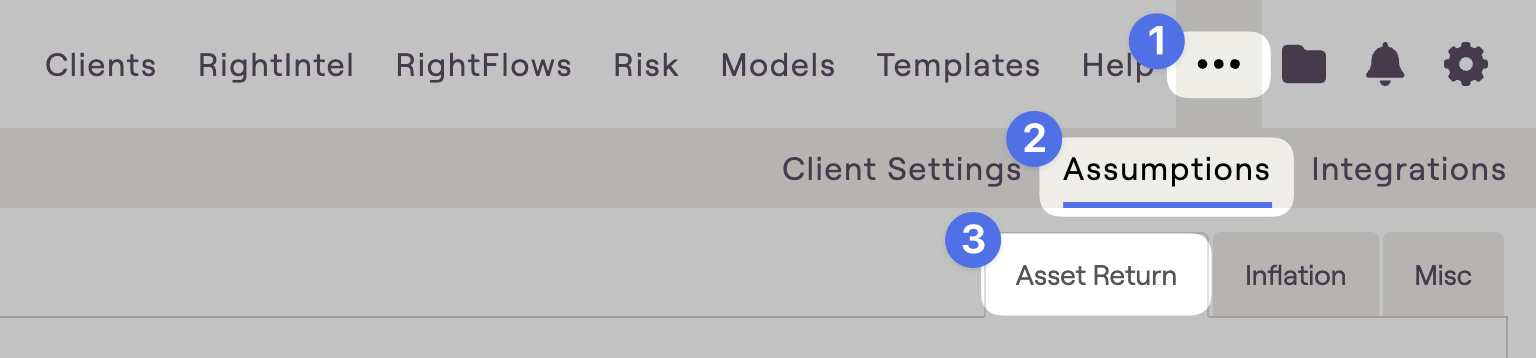
RightCapital will look to your asset return assumptions to calculate the annual return and standard deviation for each of your model portfolios. Return assumptions can be adjusted in the ... More Menu > Assumptions tab of the Advisor Portal:
Within a client plan, you can use your custom models to allocate a client's existing accounts in the Profile > Net Worth section. This will determine the overall allocation for the Current Plan.
You can also use custom model portfolios to propose a new asset allocation in the Retirement > Analysis section. This will determine the allocation for the Proposed Plan.
Deleting a portfolio that is being used within one or more client plans will reset the portfolio selection within the plan(s), depending on where it was used:
If the deleted model was being used within the Action Items, the action item will be reset as if it was never adjusted.
If the model was used in other areas (such as the Investment module or the Profile > Net Worth), the model will be reset to reflect your Target Allocation Client Preset.
The main different between Asset Class Based and Holdings Based model types is the way that the model portfolios are built. Asset Class Based portfolios are built by manually entering the percentage for each asset class. Holdings Based portfolios are built by entering individual holdings and specifying the ticker symbol and quantity for each.
Quick video tutorials for each can be found via the links below: