In the Action Items, users can customize the disability scenario for each client. As a default, the disability scenario begins tomorrow and lasts through retirement. Users can propose additional disability coverage for each client scenario by adjusting the following variables.
When you click on the 'Edit' button, you will see a screen illustrating various goals, expenses, savings, and strategies that you can change to see the impact on the insurance projection.
You can check off the boxes in front of any action items you wish to include to add them to the action items section and click Save to return to the action items screen to make any changes. There is also a “Select all” checkbook on the top-right-hand side if you wish to have all the action items included in your action items list.
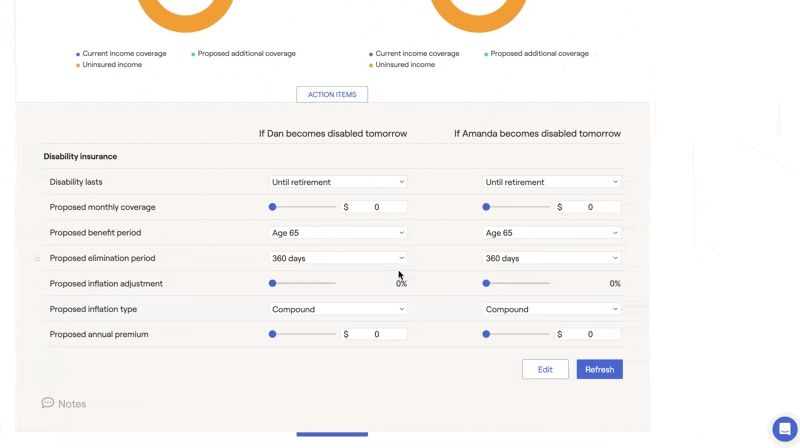
When you click on the 'Edit' button, you will see a screen illustrating various goals, expenses, savings, and strategies that you can change to see the impact on the insurance projection.
You can check off the boxes in front of any action items you wish to include to add them to the action items section and click Save to return to the action items screen to make any changes. There is also a “Select all” checkbook on the top-right-hand side if you wish to have all the action items included in your action items list.


